我用 AI海报生成器做了 10 张产品海报,只有 3 张能直接投放
我用 AI海报生成器测试产品海报、产品海报设计、电商产品图和商品海报。10 张里只有 3 张接近可投放,这篇拆解哪些能用、哪些会翻车,以及我会复用的提示词结构。
Emily Rodriguez
·2 min read

周二晚上 11:42,我把 10 张商品图丢进 GPT Image2 Studio,然后给自己定了一条规则:
不允许用 Photoshop 救图。
如果 AI 改了商品外形,这张图失败。
如果海报很好看,但标题读不清,这张图失败。
如果它像灵感板,而不像一张能给消费者看的广告图,这张图也失败。
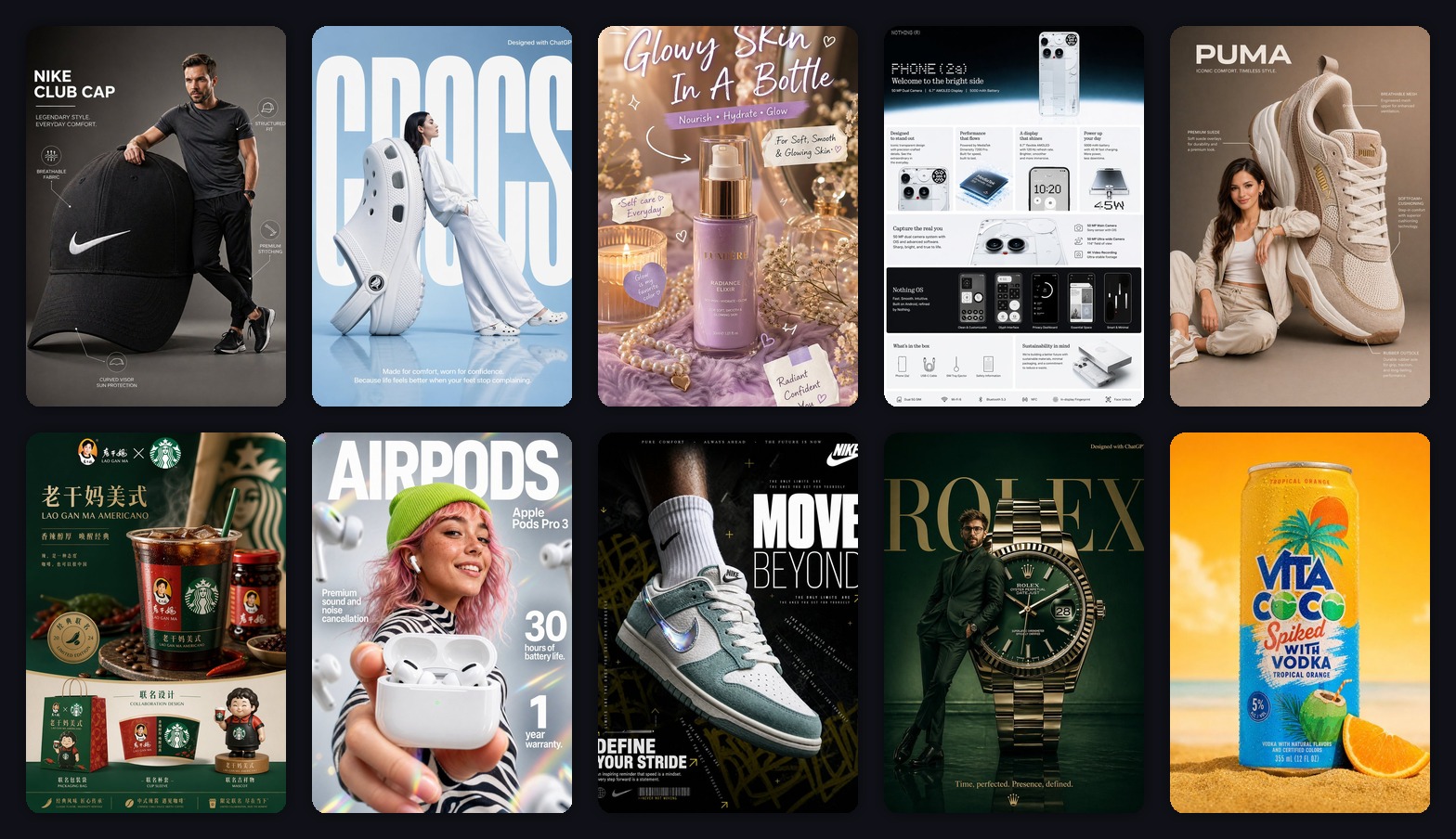
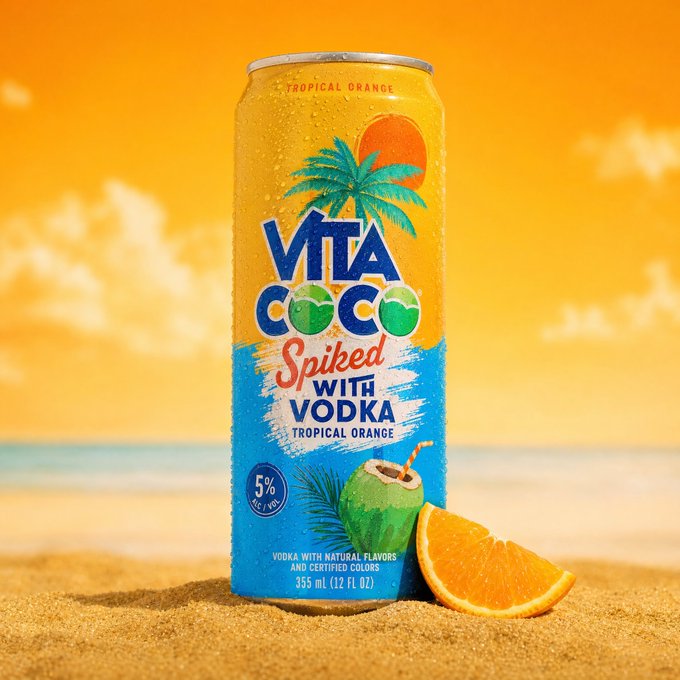
测试素材很接近真实电商团队每天会遇到的状态:球鞋、耳机、护肤瓶、腕表、手机卖点图、饮料罐,还有几张偏 campaign 的产品海报。
结果比我预想得更清醒。
10 张里,只有 3 张接近能直接投放。4 张经过提示词修正后有价值。剩下 3 张第一眼很惊艳,放大看商品细节就不行。
快速答案:AI海报生成器适合做产品海报草图、商品海报和电商产品图变体,但要想直接投放,必须先控制商品外形、文字数量和卖点声明。
这就是 2026 年 AI 产品海报的真实状态:模型已经很会做漂亮画面了。难点变成了让它 足够准确,准确到能拿去卖货。
读完这篇,你会拿到我会继续复用的提示词结构、最容易踩坑的地方,以及一张“看起来高级”和一张“真的能承接电商转化”的海报之间的区别。
第一个失败点:只说“做高级一点”
我第一反应是让模型做一张高级海报。
这个要求太空了。
模型会把“高级”理解成暗调、反光、戏剧化字体和昂贵的灯光。但电商团队真正需要的是:保住 SKU 外形,卖点层级读得清,不要编造不存在的功效和认证。
失败提示词长这样:
Make a premium product poster for this product. Make it look modern, high-end, and viral.它生成的图放在作品集里可能不错,但放大看就会出现这些问题:
- 商品外形被轻微重设计。
- 标签变成装饰纹理。
- 海报里出现一堆假字。
- 商品本身被氛围抢走。
- 结果像品牌灵感图,不像品牌成品。
这就是陷阱:AI 会让第一版看起来已经完成。
但对电商来说,只有商品经得起检查,这张图才算开始可用。
真正起作用的提示词结构
有用的提示词不是因为更长,而是因为它给模型分配了清楚的任务。
我会用这个结构:
Create a [aspect ratio] ecommerce product poster using the uploaded product image as the reference.
Product anchor:
Keep the product geometry, color, logo placement, material texture, and key silhouette accurate. Do not redesign the product.
Poster type:
Make it a [launch poster / product infographic / lifestyle campaign / social ad / sale poster].
Composition:
Place the product as the main hero object. Use [background style], [lighting style], and [camera angle]. Leave clean negative space for headline and callouts.
Text system:
Add one short headline, one benefit line, and 3 small callout labels. Keep all text clean, readable, and correctly spelled.
QA constraints:
No extra logos. No fake certifications. No unreadable microtext. No distorted product proportions. Premium commercial advertising quality.这一版提示词把输出从“好看的 AI 图”拉回到“可用的创意方向”。
模型不再乱猜版式。它知道商品是锚点,海报类型是格式,文字数量是限制。
规则 1:先选海报任务,再选风格
测试里最好的海报都不是从风格开始的。
它们先回答一个问题:这张图要完成什么任务?
| 海报任务 | 它要解决的问题 | 提示词优先级 |
|---|---|---|
| 新品发布海报 | 让商品显得新、值得买 | 强主视觉、短标题、高级灯光 |
| 产品卖点图 | 快速解释功能 | 清晰标签、图标、网格、少装饰 |
| 生活方式 campaign | 展示使用场景 | 人物关系、环境、真实比例 |
| 杂志感广告 | 建立品牌情绪 | 戏剧灯光、强构图、自信字体 |
| 社媒促销图 | 快速停住滚动 | 大利益点、高对比、简单版式 |
跳过这一步,模型就会做出“视觉汤”:一点时尚、一点详情图、一点海报、一点随机字体。
先选任务,图就更容易判断。
规则 2:商品准确性比海报戏剧性重要
网上很多 AI 海报案例有一个问题:它们很好看,但商业上没用。
对真实商品来说,参考图不是灵感,而是约束。
这在这些品类尤其重要:
- 球鞋:走线、鞋底形状、Logo 位置很容易漂移。
- 耳机和电子产品:接口、传感器、收纳盒几何结构都很关键。
- 腕表和珠宝:反光会掩盖错误细节。
- 护肤品和饮料:标签位置和瓶身形状就是品牌资产。
商品可以被放大,可以放进超现实场景,也可以和模特互动。但它不能悄悄变成另一个 SKU。
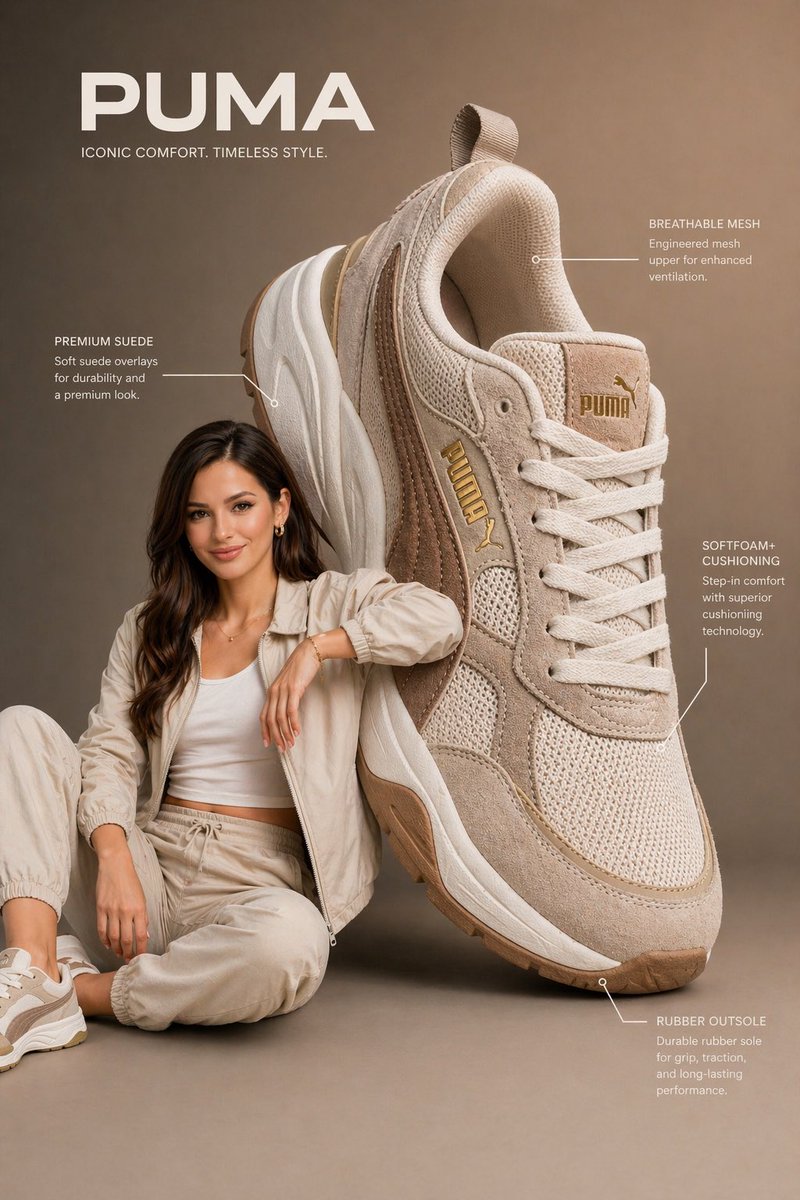
这张球鞋海报能用,是因为提示词要求模型解决一个具体的空间关系:巨大的鞋放在模特旁边,模特自然互动,标注保持次要。
我会这样写:
Create a premium vertical 3:4 ecommerce poster from the uploaded product reference.
Scene:
An oversized [product category] is placed beside a [model description]. The product is nearly the same height as the seated model, creating a dramatic but believable advertising composition. The model interacts naturally with the product without covering key details.
Product accuracy:
Preserve the product shape, color, stitching, logo placement, material texture, sole design, and key features. Do not redesign the product.
Layout:
Use a clean studio background with a soft gradient. Add thin annotation lines and 3 small callout labels for material, comfort, and construction. Keep the callouts elegant and not cluttered.
Lighting:
Soft commercial studio lighting, gentle shadows, crisp texture, realistic depth of field.
Typography:
One short brand-style headline at the top. One small benefit line near the bottom. Clean sans-serif type, readable, no misspellings.重点不是“酷一点”,而是把广告的空间设计讲清楚。
规则 3:先限制文字,不然模型会自己做一本杂志
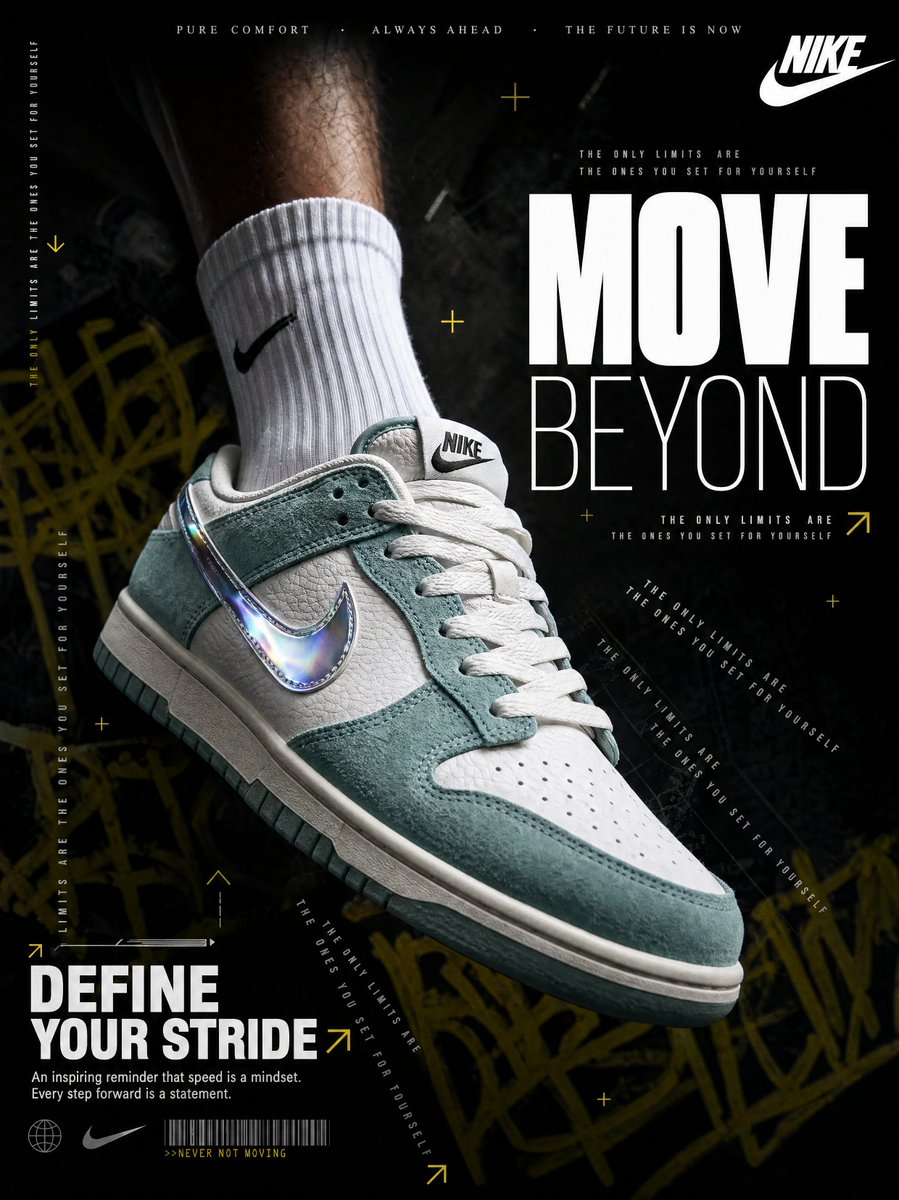
暗色球鞋海报是这一批里最能停住滚动的图。
它有运动感、层级、对比和主商品。但它也暴露了 AI 海报最大的问题:模型一旦开始加字,就会越加越多。
解决办法是给字体一个预算:
Typography:
Use only one massive 2-word headline, one slogan lockup, and one short benefit line. Optional microtext may be used only as decorative texture. Main text must be readable.“文字预算”会把海报从 AI 字体爆炸拉回可控版式。
规则 4:美妆类提示词要把功效声明砍一半
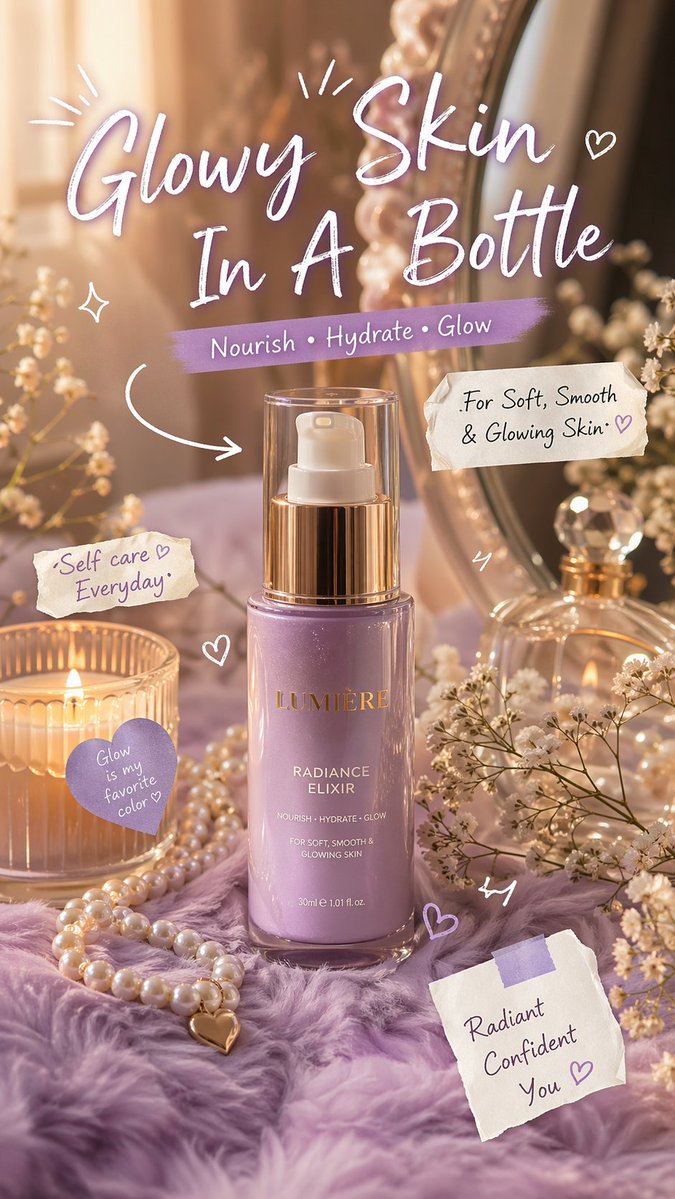
护肤品海报是我视觉上很喜欢、但一开始最不放心的一张。
暖光、梳妆台、珍珠、手写标题都成立。
问题是:美妆和健康类海报最容易被模型编造功效。它会主动写 glow、hydration、repair、radiance、confidence。有些只是品牌语气,有些会变成合规风险。
我会加这一句:
Do not mention medical results, clinical proof, guaranteed outcomes, or ingredient percentages unless they appear in the reference.这句话不性感,但很有用。
它能让图少一点“乱承诺”,多一点可交付性。
规则 5:海报和详情图不是同一种资产
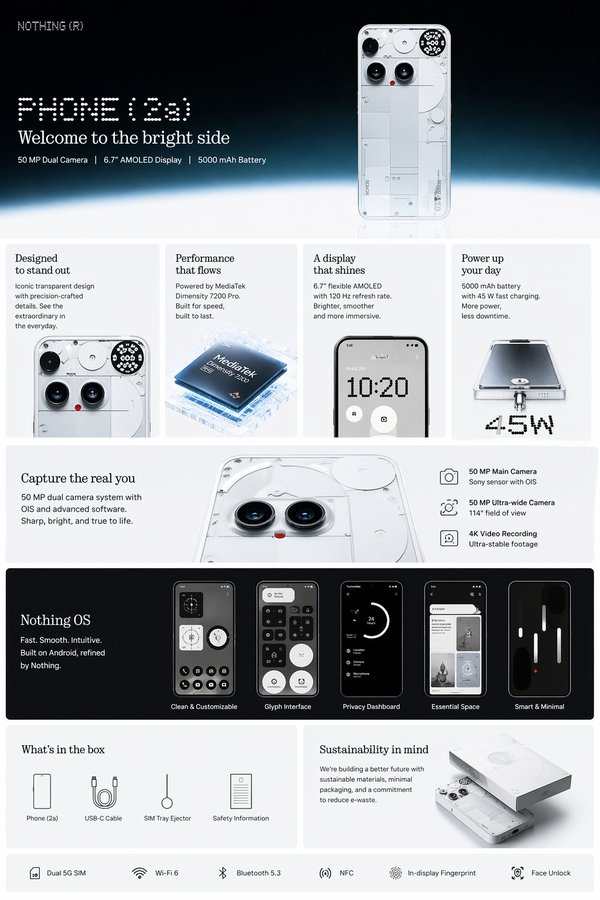
手机卖点图不是最有情绪的一张。
但它很有用。
电商不只需要海报。它需要一组图:
- 主图
- 卖点详情图
- 局部特写
- 生活方式图
- 尺寸或使用图
- 活动海报
- 社媒裁切版本
如果目标是吸引注意力,做海报。
如果目标是提高转化,海报之外还要做详情图。
详情图提示词应该更冷静:
Create a clean ecommerce product-detail infographic from the uploaded product reference.
Layout:
Use a vertical product-page layout. Top section: product hero image and short headline. Middle section: 4 feature cards with small icons and concise labels. Lower section: detail closeups, compatibility or usage notes, and what is included in the box.
Text:
Use short feature labels only. Keep every label readable. Avoid paragraphs inside the image.
QA:
Preserve product geometry. Do not invent unsupported specs. Do not add fake certifications, app screens, or ports that are not visible in the reference.我的 30 秒 QA 清单
我不会让一张 AI 产品海报直接离开草稿箱,除非它通过这 6 个检查:
- 眯眼测试: 两秒内能看懂这张图在卖什么吗?
- 商品测试: 商品还和参考图一致吗?
- 文字测试: 主标题读得清、拼得对吗?
- 声明测试: 模型有没有编造规格、折扣、保修、成分、认证?
- 裁切测试: 改成 4:5、9:16、16:9 还成立吗?
- 信任测试: 我敢把这张图给创始人、客户或平台审核看吗?
大多数失败图都会倒在其中一项。
漂亮但没用的图,通常倒在商品测试。
信息太满的图,通常倒在眯眼测试。
风险高的图,通常倒在声明测试。
我会怎样在 GPT Image2 Studio 里跑这套流程
流程很短:
- 上传一张干净商品参考图。
- 先选比例:产品海报用 3:4,社媒用 4:5,落地页用 16:9。
- 用基础提示词生成一张 campaign 海报。
- 复制提示词,分别改成 editorial 版本和 infographic 版本。
- 不要只相信第一张,横向比较多个模型。
- 把胜出的提示词保存成品类模板。
文字多的海报,我会优先测 GPT Image 2 或 GPT Image 1.5 high。材质和微距产品图,我会和 Nano Banana Pro 对比。快速探索方向时,我会先用便宜模型跑草图,再把胜出方向切到高质量。
这就是多模型工作台的价值:同一个商品、同一个提示词,直接看不同模型的强项。
The Bottom Line
- AI 已经能很快做出漂亮产品海报,难点不在“好看”。
- 真正的难点是商品准确、文字可读、卖点安全。
- 先定义海报任务:新品、详情、生活方式、杂志广告,还是促销。
- 给模型文字预算:一个标题、一个利益点、三个标注通常够了。
- 电商要同时做海报和详情图,它们解决的是不同问题。
- 最快的流程是一张商品参考图、一套可复用提示词结构、在 GPT Image2 Studio 里做模型对比。
最简单的起步提示词是:
Create a vertical 3:4 ecommerce product poster from this product reference, preserving the exact product shape and material, with a premium commercial background, one short headline, one benefit line, and 3 clean feature callouts.这已经足够拿到第一张有用草图。
剩下的不是魔法,是判断力。
Frequently asked questions
Do I need a credit card to try GPT Image2 Studio?
No. Every new account starts with 30 credits on signup, then unlocks 30 more after the first successful image. Paid plans only kick in if you want more than the free ceiling.
Can I use the generated images commercially?
Yes. Every tier — including the free starter credits — comes with full commercial rights. Run ads, sell products, print on merchandise, publish on any platform. No watermark, no attribution required.
Which model should I route to for what?
Hero ads and text-heavy creative → GPT Image 1.5 (high). Product and macro texture work → Nano Banana Pro. High-volume social iteration → Nano Banana 2. Fast drafts and mood boards → Z Image. Our workbench routes one prompt across all of them in one click.
How fast is a single generation?
Z Image returns in ~10 seconds. Nano Banana 2 in 15–20. Nano Banana Pro and GPT Image 1.5 (high) in 30–45 for standard quality, up to a minute for 4K high-quality. Parallel runs across all models take the same wall-clock time as the slowest one.
What's the difference between GPT Image 1.5 (high) and Nano Banana 2?
On the April 2026 ImagineArt 2.0 Arena, GPT Image 1.5 (high) sits at 1275 ELO, Nano Banana 2 at 1264 — inside each other's confidence intervals (an 11-point gap with ±10/±11 CI means the order can flip on any given week). GPT Image 1.5 (high) wins decisively on text inside images; Nano Banana 2 is 2–3× faster and half the API cost.
Can I edit an existing image instead of generating from scratch?
Yes. All top-3 models support image-to-image and masked editing. Upload your reference, draw a mask over the region you want changed, and prompt the edit. The Nano Banana family and GPT Image 1.5 both preserve product geometry when given a reference — important for commercial product work.
Stop guessing the model.
Run all three.
We route your prompt to GPT Image 1.5 (high), Nano Banana 2, Z Image and more — same workbench, same prompt, side-by-side blind compare. 30 credits on signup, another 30 after your first successful image, and commercial rights at every tier.
30 + 30
Free credits
5+
SOTA models
30s
To first render