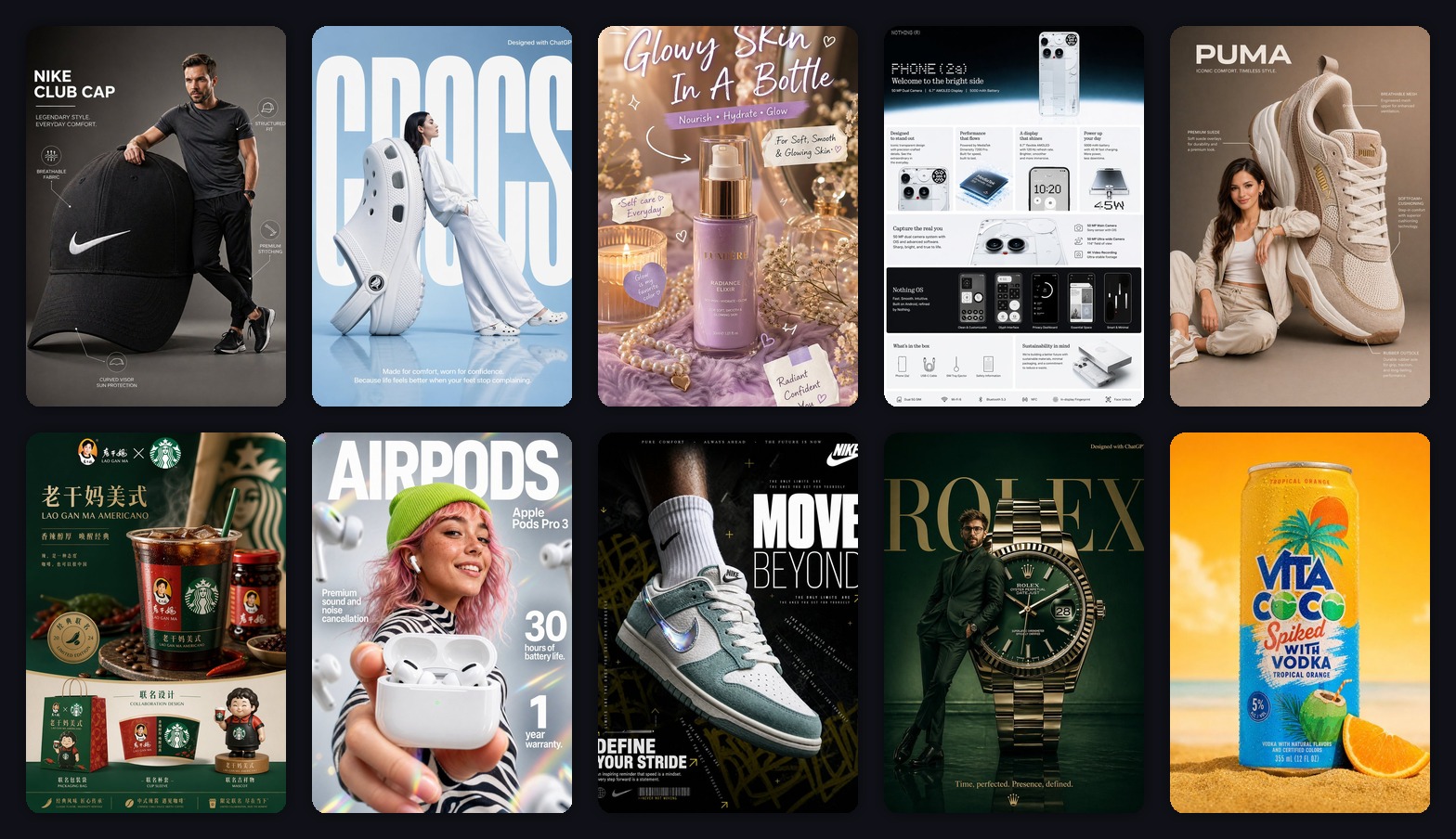
I Tested an AI Product Poster Generator on 10 Products. Only 3 Were Ready to Ship.
I tested an AI product poster generator on sneakers, earbuds, skincare, watches, drinks, and ecommerce infographics. Only 3 outputs were campaign-ready. Here is what worked, what failed, and the prompt structure I would reuse.
Emily Rodriguez
·6 min read

At 11:42 p.m. on a Tuesday, I dropped ten product images into GPT Image2 Studio and gave myself one rule:
No Photoshop rescue.
If the AI changed the product shape, the image failed. If the poster looked pretty but the headline was unreadable, it failed. If it looked like a mood board instead of something a brand could put in front of customers, it failed.
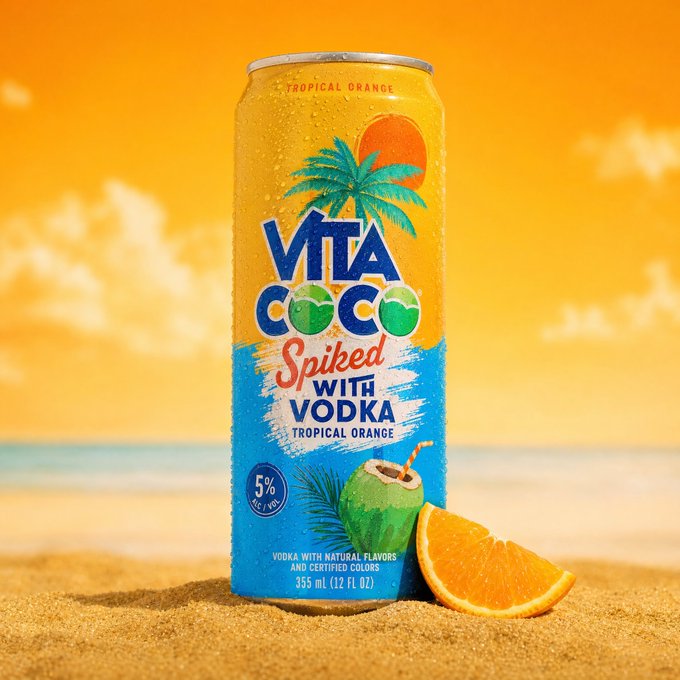
The test set was messy in the right way: sneakers, earbuds, skincare, a watch, a phone-detail graphic, a drink can, and a few campaign-style product posters.
The result surprised me.
Three images were close to campaign-ready. Four were useful after prompt surgery. Three looked impressive for five seconds, then fell apart when I checked the product details.
That is the real lesson of AI product posters in 2026: the model can make something beautiful almost immediately. The hard part is making something accurate enough to sell from.
By the end of this post, you will have the exact prompt structure I would reuse, the mistakes I would avoid, and the difference between a poster that gets compliments and a poster that can actually support an ecommerce campaign.
Try the exact product-poster starter prompt
Open GPT Image2 Studio with the poster prompt already loaded, upload one product photo, and generate a vertical 3:4 campaign draft.
Generate a product poster free
The first failure: "make it look premium"
My first instinct was to ask for a premium poster.
That was too vague.
The model understood "premium" as dark shadows, shiny reflections, dramatic type, and expensive-looking lighting. It did not always understand what the ecommerce team actually needed: preserve the SKU, make the feature hierarchy readable, and avoid inventing fake claims.
The bad prompt looked like this:
Make a premium product poster for this product. Make it look modern, high-end, and viral.The outputs looked good in a gallery. But when I zoomed in, I found the usual problems:
- Product shapes were slightly redesigned.
- Labels became decorative texture.
- The poster had too many fake words.
- The product was sometimes smaller than the mood.
- The result looked like brand inspiration, not brand output.
That is the trap. AI makes the first draft feel finished.
For ecommerce, it is not finished until the product survives inspection.
The prompt that changed the test
The useful prompt was not longer because I wanted more words. It was longer because it gave the model a job.
Here is the structure that worked:
Create a [aspect ratio] ecommerce product poster using the uploaded product image as the reference.
Product anchor:
Keep the product geometry, color, logo placement, material texture, and key silhouette accurate. Do not redesign the product.
Poster type:
Make it a [launch poster / product infographic / lifestyle campaign / social ad / sale poster].
Composition:
Place the product as the main hero object. Use [background style], [lighting style], and [camera angle]. Leave clean negative space for headline and callouts.
Text system:
Add one short headline, one benefit line, and 3 small callout labels. Keep all text clean, readable, and correctly spelled.
QA constraints:
No extra logos. No fake certifications. No unreadable microtext. No distorted product proportions. Premium commercial advertising quality.That one change moved the output from "nice AI image" to "usable creative direction."
The model stopped guessing the layout. It knew the product was the anchor, the poster type was the format, and the text had a clear limit.
Rule 1: choose the poster job before the style
The best posters in the test did not start with a style.
They started with a job.
| Poster job | What it needs to do | Prompt priority |
|---|---|---|
| Product launch poster | Make the product feel new and desirable | Strong hero object, bold headline, premium lighting |
| Product infographic | Explain features quickly | Clean labels, icons, grid layout, fewer decorative elements |
| Lifestyle campaign | Show the product in use | Human interaction, environment, believable scale |
| Editorial ad | Create brand mood | Dramatic lighting, confident type, strong composition |
| Social sale poster | Stop the scroll and communicate fast | Large offer, high contrast, simple layout |
When I skipped this step, the model made visual soup: a little fashion, a little infographic, a little poster, a little random typography.
When I chose the job first, the image became easier to judge.
Rule 2: product accuracy beats poster drama
This is where most AI poster content online is misleading.
A dramatic poster can still be commercially useless.
For a real product, the reference image is not just inspiration. It is the constraint.
That matters most for:
- Sneakers, where stitching, sole shape, and logo placement drift easily.
- Earbuds and electronics, where ports, sensors, and case geometry matter.
- Watches and jewelry, where reflections can hide broken details.
- Skincare and beverages, where label position and bottle shape are part of the brand.
The product can be oversized. It can sit in a surreal set. It can be paired with a model. But it cannot quietly become a different SKU.
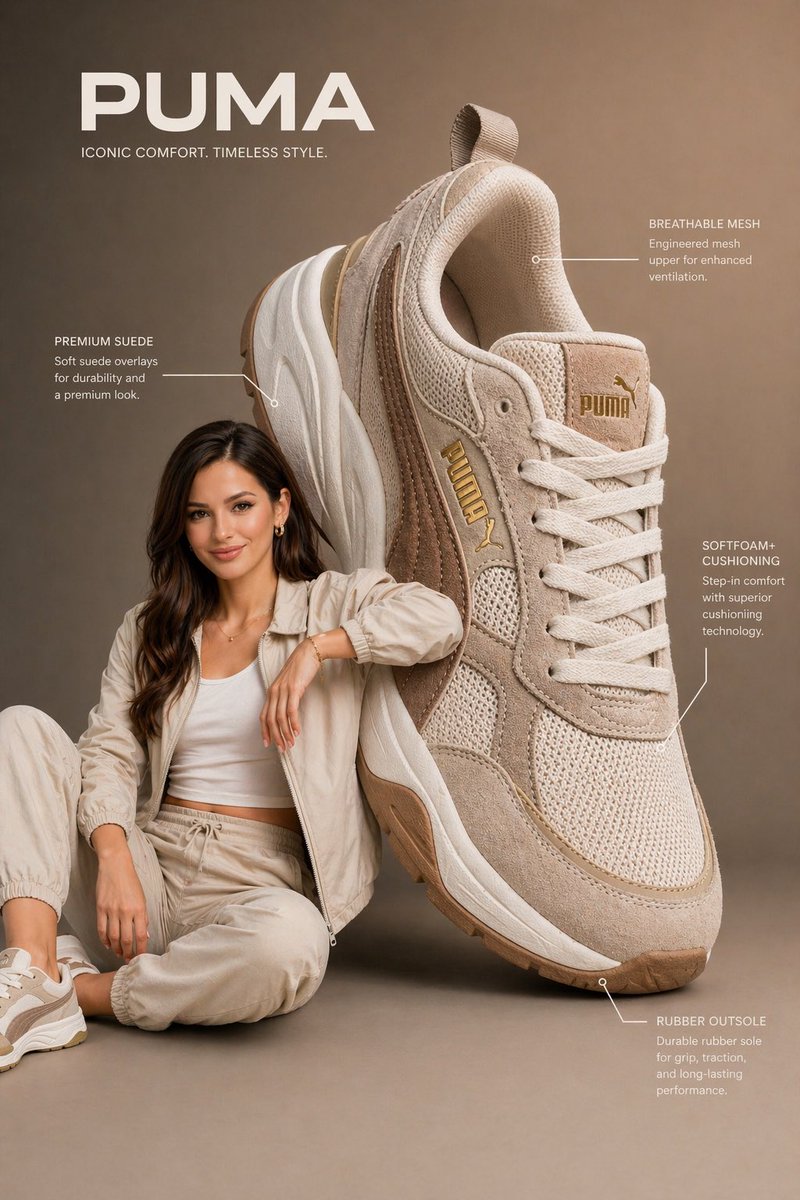
This Puma-style poster worked because the prompt did one smart thing: it gave the model a physical relationship to solve. The oversized shoe sits beside the model, the model interacts with it, and the callouts stay secondary.
Here is the cleaned-up version of that prompt:
Create a premium vertical 3:4 ecommerce poster from the uploaded product reference.
Scene:
An oversized [product category] is placed beside a [model description]. The product is nearly the same height as the seated model, creating a dramatic but believable advertising composition. The model interacts naturally with the product without covering key details.
Product accuracy:
Preserve the product shape, color, stitching, logo placement, material texture, sole design, and key features. Do not redesign the product.
Layout:
Use a clean studio background with a soft gradient. Add thin annotation lines and 3 small callout labels for material, comfort, and construction. Keep the callouts elegant and not cluttered.
Lighting:
Soft commercial studio lighting, gentle shadows, crisp texture, realistic depth of field.
Typography:
One short brand-style headline at the top. One small benefit line near the bottom. Clean sans-serif type, readable, no misspellings.The lesson: do not ask for a "cool shoe ad." Ask for the spatial design of the ad.
Rule 3: limit the text before the model invents a magazine
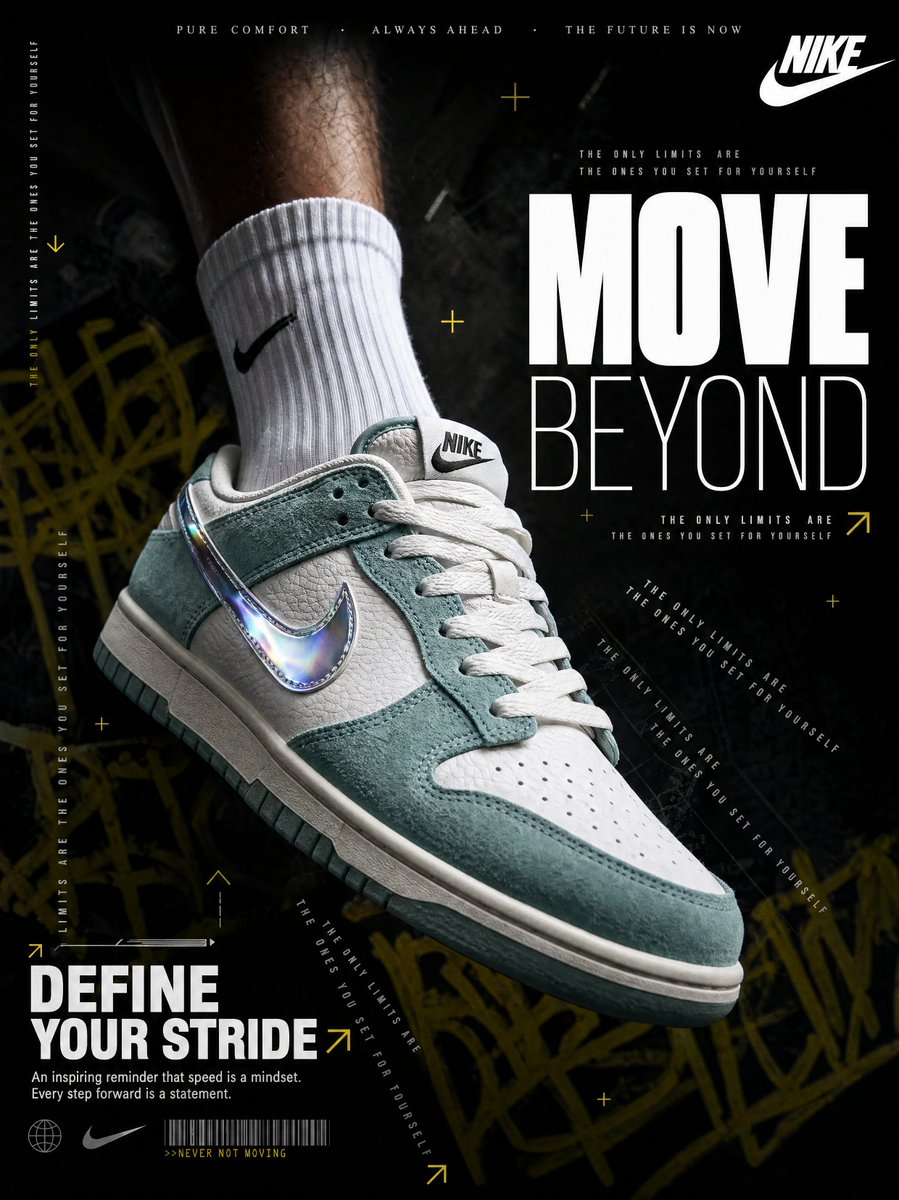
The dark sneaker poster was the strongest scroll-stopper in the batch.
It had motion, hierarchy, contrast, and a clear hero product. But it also showed me the biggest risk with AI poster design: once the model starts adding type, it wants to keep adding type.
The fix is to give the typography a budget.
Create a vertical 3:4 sneaker advertising poster from the uploaded shoe reference.
Composition:
The sneaker dominates the lower two-thirds of the frame at a bold diagonal angle. Show a cropped athletic leg and clean crew sock above it, but keep sharp focus on the shoe.
Background:
Near-black charcoal studio background with subtle urban texture, faint graffiti strokes, and a heavy vignette. The mood should feel fast, premium, and editorial.
Lighting:
One cold directional key light from the left, bright edge highlights on leather and metallic details, deep shadow falloff.
Typography:
Use only one massive 2-word headline, one slogan lockup, and one short benefit line. Optional microtext may be used only as decorative texture. Main text must be readable.
QA:
Preserve the shoe shape, logo placement, material texture, and color. No extra shoes. No warped sole. No misspelled main headline.That "typography budget" is the difference between a controlled poster and an AI type explosion.
Rule 4: for beauty products, cut every claim in half
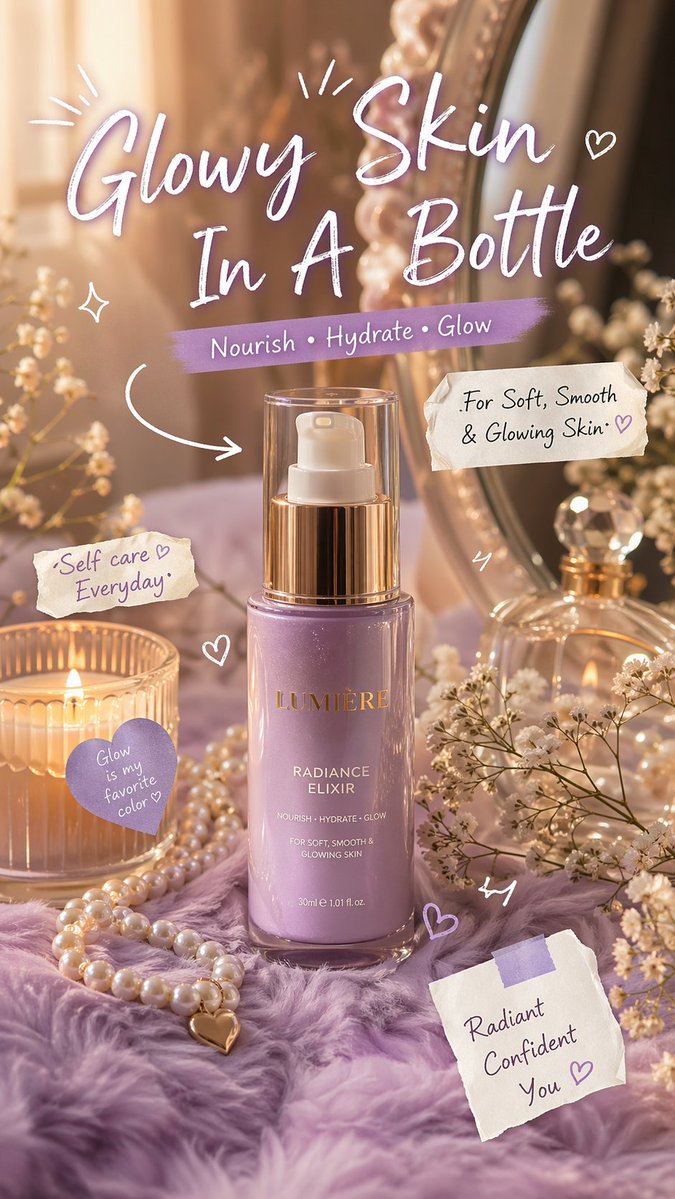
The skincare poster was the one I liked visually but trusted least at first.
Warm light, vanity props, handwritten notes, soft texture: all of that worked.
But beauty posters are dangerous because the model loves to invent claims. It will happily add promises about glow, hydration, smooth skin, repair, radiance, and confidence. Some of that is harmless brand language. Some of it can become a compliance problem.
This is the safer version:
Create a vertical 3:4 skincare product poster using the uploaded bottle as the exact reference.
Scene:
Place the bottle upright in a warm vanity setup with soft reflections, pearl accents, fabric texture, and small lifestyle props. Keep the bottle label readable and centered.
Lighting:
Warm golden light, soft highlights on the cap, gentle bokeh in the background, glossy but realistic product reflections.
Typography:
Use one emotional headline and 3 short lifestyle callouts. Keep claims soft and cosmetic. Do not mention medical results, clinical proof, guaranteed outcomes, or ingredient percentages unless they appear in the reference.
Tone:
Self-care, soft glow, premium but approachable.
QA:
Do not change the bottle shape. Do not invent medical claims. Keep label text clean. Avoid clutter around the product.The line I now add to almost every beauty or wellness prompt:
"Do not invent medical claims, certifications, or guaranteed results."
It is boring. It saves the image.
Rule 5: posters and product-detail images are different assets
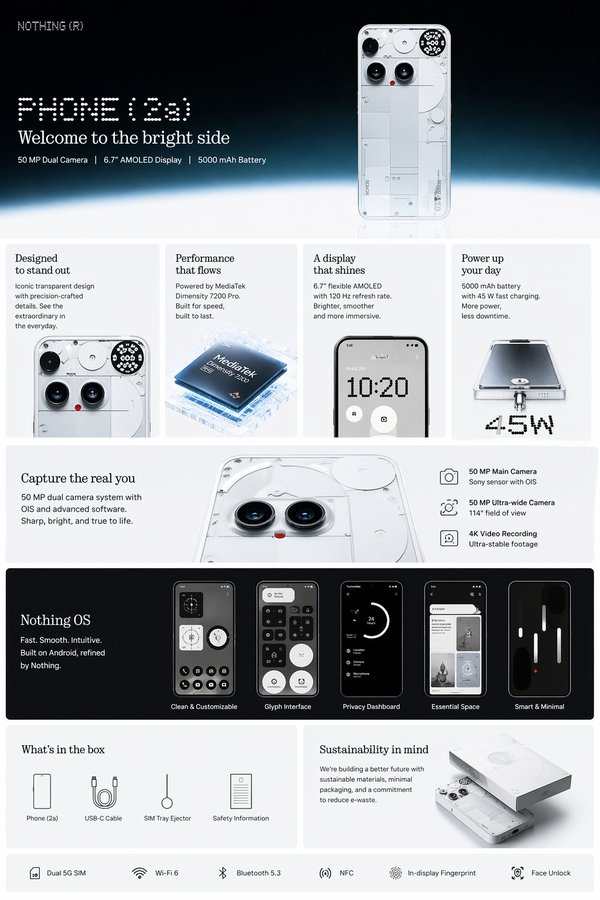
The phone graphic was not the most emotional image in the test.
It was still one of the most useful.
That is because ecommerce does not only need posters. It needs image sets:
- Hero image
- Feature infographic
- Detail closeups
- Lifestyle image
- Scale or usage image
- Offer or launch poster
- Social crop
The prompt for a product-detail image should be calmer:
Create a clean ecommerce product-detail infographic from the uploaded product reference.
Layout:
Use a vertical product-page layout. Top section: product hero image and short headline. Middle section: 4 feature cards with small icons and concise labels. Lower section: detail closeups, compatibility or usage notes, and what is included in the box.
Visual style:
Premium tech product page, clean white and light-gray background, crisp shadows, sharp product renders, modern grid system.
Text:
Use short feature labels only. Keep every label readable. Avoid paragraphs inside the image.
QA:
Preserve product geometry. Do not invent unsupported specs. Do not add fake certifications, app screens, or ports that are not visible in the reference.If the goal is attention, make a poster.
If the goal is conversion, make the poster plus the detail image.
My 30-second QA test
Before I would let one of these images leave the draft folder, I run a fast check:
- Squint test: Can I understand the poster in two seconds?
- Product test: Does the product still match the reference?
- Text test: Are the main words readable and spelled correctly?
- Claim test: Did the model invent specs, discounts, warranty, ingredients, or certifications?
- Crop test: Would this still work as 4:5, 9:16, or 16:9?
- Trust test: Would I be comfortable showing this to a founder, client, or marketplace reviewer?
Most bad AI posters fail one of those six checks.
The pretty ones usually fail the product test.
The busy ones usually fail the squint test.
The risky ones usually fail the claim test.
How I would run this inside GPT Image2 Studio
The workflow is short:
- Upload one clean product reference.
- Pick the ratio before generation: 3:4 for product posters, 4:5 for social, 16:9 for landing pages.
- Start with the base prompt.
- Generate one clean campaign poster.
- Duplicate the prompt into an editorial version and an infographic version.
- Compare models instead of trusting the first render.
- Save the winning prompt as a category template.
For text-heavy posters, I usually start with GPT Image 2 or GPT Image 1.5 (high). For texture-heavy product work, I compare against Nano Banana Pro. For fast direction testing, I use a cheaper model first, then rerun the winner at higher quality.
That is the reason to use a multi-model workbench: same product, same prompt, different model strengths.
Run the product poster experiment on your own SKU
Upload one product photo, keep the preloaded prompt, and generate a vertical 3:4 poster. Then duplicate it into a lifestyle version and an infographic version.
Open the generator with this prompt
The Bottom Line
- AI can make beautiful product posters quickly. That is no longer the hard part.
- The hard part is keeping the product accurate, the text readable, and the claims safe.
- Start with the poster job before the style: launch, infographic, lifestyle, editorial, or sale.
- Give the model a typography budget. One headline, one benefit line, three callouts is usually enough.
- For ecommerce, make a poster and a detail image. They solve different problems.
- The fastest workflow is one product reference, one reusable prompt structure, and model comparison inside GPT Image2 Studio.
If you want the simplest starting point, upload one clean product photo and use this:
Create a vertical 3:4 ecommerce product poster from this product reference, preserving the exact product shape and material, with a premium commercial background, one short headline, one benefit line, and 3 clean feature callouts.That is enough to get your first useful draft.
The rest is not magic. It is judgment.
Frequently asked questions
Do I need a credit card to try GPT Image2 Studio?
No. Every new account starts with 30 credits on signup, then unlocks 30 more after the first successful image. Paid plans only kick in if you want more than the free ceiling.
Can I use the generated images commercially?
Yes. Every tier — including the free starter credits — comes with full commercial rights. Run ads, sell products, print on merchandise, publish on any platform. No watermark, no attribution required.
Which model should I route to for what?
Hero ads and text-heavy creative → GPT Image 1.5 (high). Product and macro texture work → Nano Banana Pro. High-volume social iteration → Nano Banana 2. Fast drafts and mood boards → Z Image. Our workbench routes one prompt across all of them in one click.
How fast is a single generation?
Z Image returns in ~10 seconds. Nano Banana 2 in 15–20. Nano Banana Pro and GPT Image 1.5 (high) in 30–45 for standard quality, up to a minute for 4K high-quality. Parallel runs across all models take the same wall-clock time as the slowest one.
What's the difference between GPT Image 1.5 (high) and Nano Banana 2?
On the April 2026 ImagineArt 2.0 Arena, GPT Image 1.5 (high) sits at 1275 ELO, Nano Banana 2 at 1264 — inside each other's confidence intervals (an 11-point gap with ±10/±11 CI means the order can flip on any given week). GPT Image 1.5 (high) wins decisively on text inside images; Nano Banana 2 is 2–3× faster and half the API cost.
Can I edit an existing image instead of generating from scratch?
Yes. All top-3 models support image-to-image and masked editing. Upload your reference, draw a mask over the region you want changed, and prompt the edit. The Nano Banana family and GPT Image 1.5 both preserve product geometry when given a reference — important for commercial product work.
Stop guessing the model.
Run all three.
We route your prompt to GPT Image 1.5 (high), Nano Banana 2, Z Image and more — same workbench, same prompt, side-by-side blind compare. 30 credits on signup, another 30 after your first successful image, and commercial rights at every tier.
30 + 30
Free credits
5+
SOTA models
30s
To first render
Keep reading

I Rebuilt an Ecommerce Shot List with AI. Four Images Were Worth Keeping.

I Tried 12 AI Movie Posters. The Best Ones Used Less Text Than I Expected.