ポスター作成 AIで商品ポスターを10枚作ったら、使えたのは3枚だけだった
AIポスター作成をEC商品画像と商品バナーの用途で検証。商品写真、スニーカー、コスメ、腕時計、ドリンクを使い、どの商品ポスターが実運用に近かったのか、プロンプト構造まで整理します。
Emily Rodriguez
·2 min read

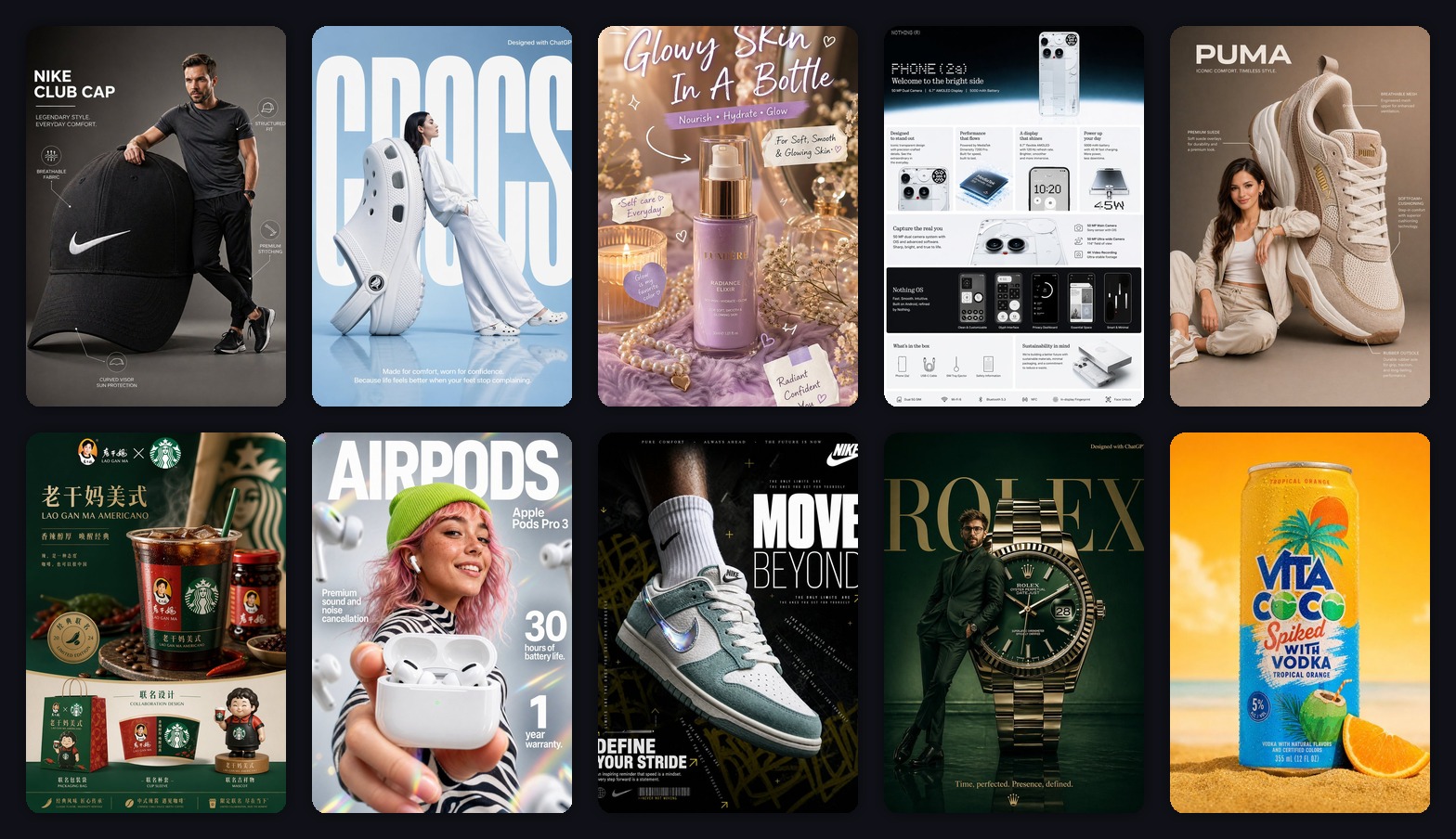
火曜の23時42分、私は10枚の商品画像を GPT Image2 Studio に入れて、自分にひとつだけルールを課しました。
Photoshopで救わない。
AIが商品の形を変えたら失敗。
ポスターはきれいでも、見出しが読めなければ失敗。
ブランドのムードボードには見えるけれど、顧客に見せる広告には見えなければ失敗。
テストした素材は、ECチームが実際に扱うものに近いものでした。スニーカー、イヤホン、スキンケアボトル、腕時計、スマホの訴求画像、ドリンク缶、キャンペーン風の商品ポスター。
結果はかなり現実的でした。
10枚のうち、そのまま広告に近かったのは3枚。4枚はプロンプトを直せば使える。残り3枚は最初の5秒だけ良く見えて、商品ディテールを見ると崩れていました。
結論から言うと、2026年のポスター作成 AI は「きれいな絵」を作る段階はもう越えています。難しいのは、EC商品画像として売るために十分正確な商品ポスターにすることです。
この記事では、私が再利用するプロンプト構造、失敗しやすいポイント、そして「褒められるポスター」と「売上導線に使えるポスター」の違いを整理します。
最初の失敗:「高級感を出して」
最初の私は、ただ「高級感のあるポスターにして」と頼みました。
これは曖昧すぎました。
モデルは「高級感」を暗い影、強い反射、ドラマチックな文字、派手な照明として解釈します。でもECチームに必要なのは、SKUの形を保つこと、訴求の階層を読めること、存在しない効能や認証を作らないことです。
悪いプロンプトはこうです。
Make a premium product poster for this product. Make it look modern, high-end, and viral.ギャラリーでは良く見えました。けれど拡大すると、よくある問題が出ます。
- 商品の形が少し変わる。
- ラベルがただの模様になる。
- 読めない偽テキストが増える。
- 商品よりムードが目立つ。
- ブランド成果物ではなく、参考画像に見える。
AIは初稿を完成品のように見せます。
でもECでは、商品が検品に耐えて初めて使えます。
使えたプロンプト構造
使えたプロンプトは長いから良いのではありません。モデルに仕事を分けているから良いのです。
Create a [aspect ratio] ecommerce product poster using the uploaded product image as the reference.
Product anchor:
Keep the product geometry, color, logo placement, material texture, and key silhouette accurate. Do not redesign the product.
Poster type:
Make it a [launch poster / product infographic / lifestyle campaign / social ad / sale poster].
Composition:
Place the product as the main hero object. Use [background style], [lighting style], and [camera angle]. Leave clean negative space for headline and callouts.
Text system:
Add one short headline, one benefit line, and 3 small callout labels. Keep all text clean, readable, and correctly spelled.
QA constraints:
No extra logos. No fake certifications. No unreadable microtext. No distorted product proportions. Premium commercial advertising quality.この構造にすると、AI画像が「きれい」から「制作判断に使える」に変わります。
ルール1:スタイルより先に、ポスターの仕事を決める
良かった商品ポスターは、スタイルから始まっていません。
まず目的がありました。
| ポスターの仕事 | 役割 | プロンプトの優先度 |
|---|---|---|
| 新商品ポスター | 新しく、欲しいと思わせる | 強い主役商品、短い見出し、上質な光 |
| 商品説明画像 | 機能を早く伝える | 読めるラベル、アイコン、グリッド |
| ライフスタイル広告 | 使用シーンを見せる | 人との関係、環境、自然なスケール |
| エディトリアル広告 | ブランドの空気を作る | 強い構図、ドラマチックな照明 |
| セール用バナー | スクロールを止める | 大きな訴求、高コントラスト、単純な構成 |
ここを飛ばすと、少しファッション、少し説明画像、少し広告、少しランダムな文字という混ざった画像になります。
ルール2:商品精度は、ポスターの派手さより重要
AIポスターの作例で一番危ないのは、きれいだけど商用に使えない画像です。
商品写真はインスピレーションではなく、制約です。
特に注意が必要なのは、スニーカー、イヤホン、腕時計、ジュエリー、スキンケア、ドリンクです。ロゴ位置、ボトル形状、ソール、ラベル、素材感がブランドそのものだからです。
商品は大きくしてもいい。シュールなセットに置いてもいい。モデルと組み合わせてもいい。けれど別のSKUになってはいけません。
このタイプでは、こう書きます。
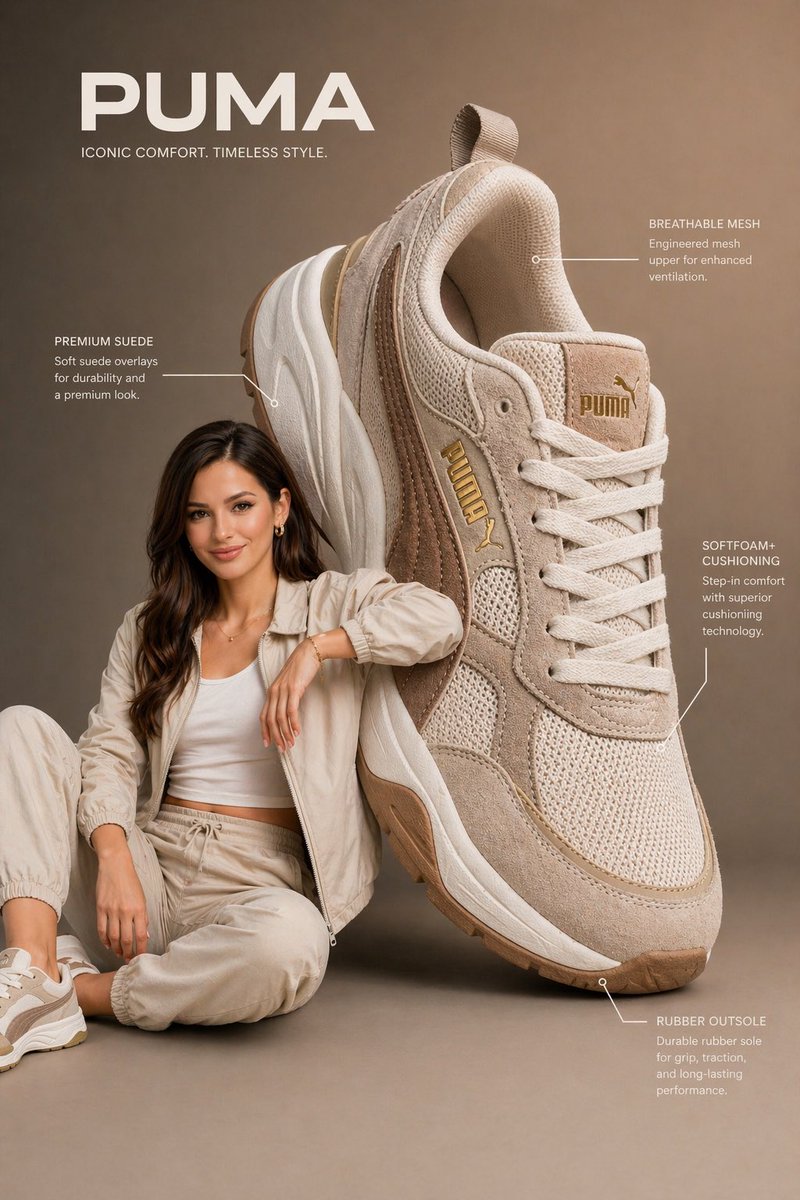
Create a premium vertical 3:4 ecommerce poster from the uploaded product reference.
Scene:
An oversized [product category] is placed beside a [model description]. The product is nearly the same height as the seated model, creating a dramatic but believable advertising composition.
Product accuracy:
Preserve the product shape, color, stitching, logo placement, material texture, sole design, and key features. Do not redesign the product.
Typography:
One short brand-style headline at the top. One small benefit line near the bottom. Clean sans-serif type, readable, no misspellings.「かっこいい靴広告」では弱いです。広告の空間設計を伝える方が強いです。
ルール3:文字の予算を先に決める
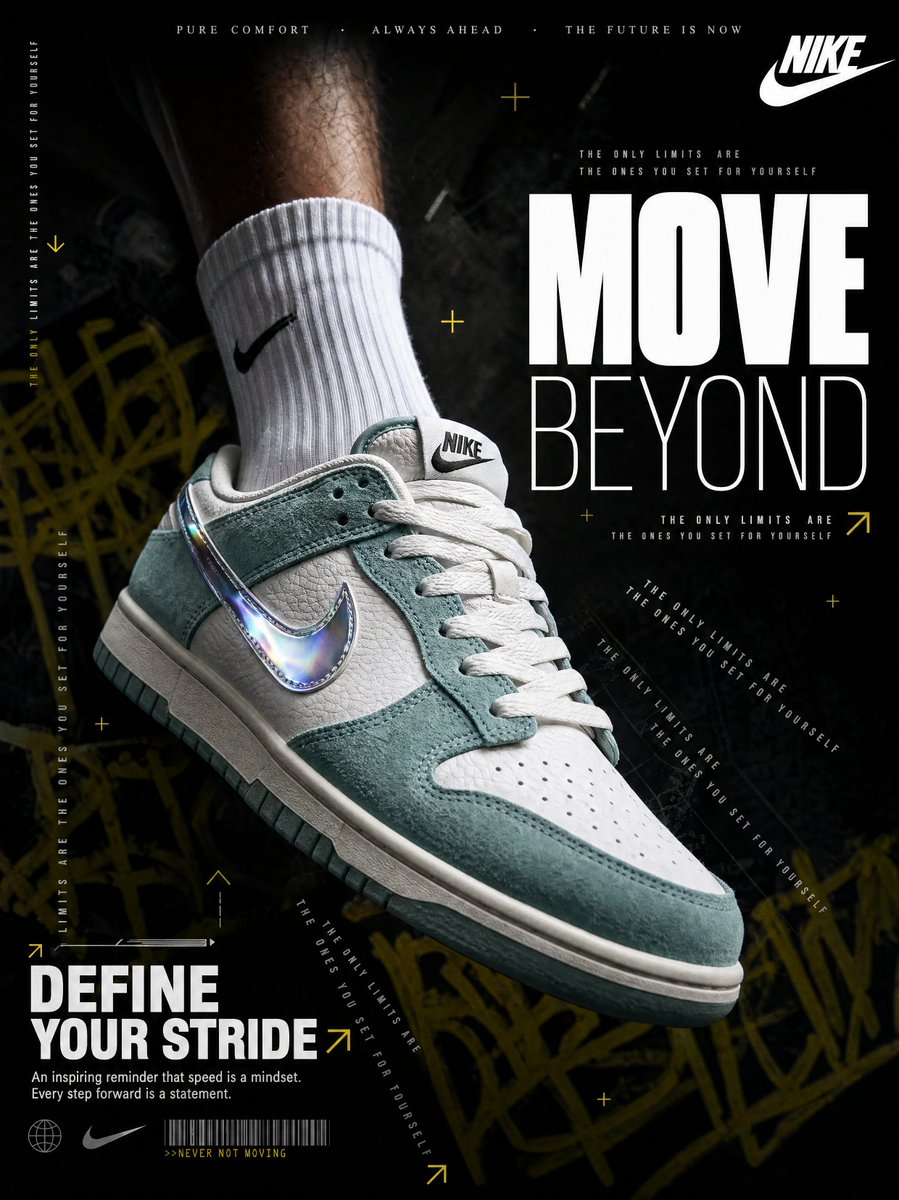
暗いスニーカーポスターは、最もスクロールを止める画像でした。
同時に、AIポスター作成の大きなリスクも見せてくれました。モデルは一度文字を入れ始めると、さらに文字を足そうとします。
私はこう制限します。
Typography:
Use only one massive 2-word headline, one slogan lockup, and one short benefit line. Optional microtext may be used only as decorative texture. Main text must be readable.文字の予算を決めると、商品バナーがAIの文字だらけになりにくくなります。
ルール4:美容商品の訴求は半分に削る
スキンケアのポスターは、見た目は好きでした。けれど最初は一番信用しにくい画像でした。
美容やウェルネスでは、モデルが効能を作りがちです。glow、hydration、repair、radiance。ブランドの雰囲気としては自然でも、法務や広告審査では危ない場合があります。
私は必ずこの一文を入れます。
Do not mention medical results, clinical proof, guaranteed outcomes, or ingredient percentages unless they appear in the reference.地味ですが、商用では効きます。
ルール5:ポスターと商品説明画像は別の資産
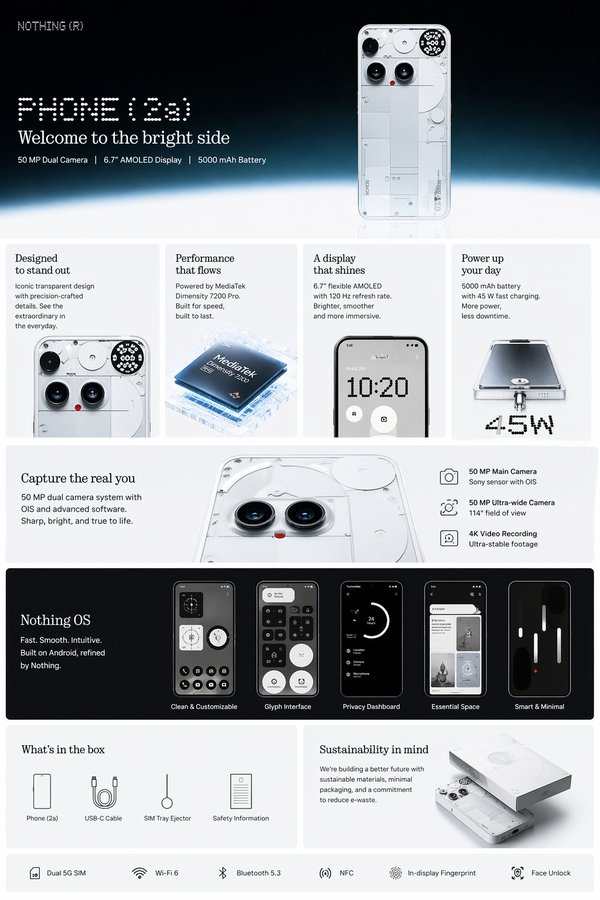
スマホの説明画像は、最も感情的な画像ではありません。
でも一番実用的な画像のひとつでした。
ECに必要なのは1枚のポスターではなく、画像セットです。
- メイン画像
- 機能説明画像
- ディテールのクローズアップ
- ライフスタイル画像
- サイズや使用シーン
- キャンペーンポスター
- SNS用クロップ
注意を取るならポスター。
購入判断を助けるなら、ポスターに加えて説明画像が必要です。
30秒のQAチェック
私は、AIで作った商品ポスターを出す前に必ずこの6つを見ます。
- 2秒テスト: 何の商品かわかるか。
- 商品テスト: 参考画像と同じ商品に見えるか。
- 文字テスト: 見出しが読めて、綴りが正しいか。
- 訴求テスト: 仕様、保証、成分、認証を作っていないか。
- クロップテスト: 4:5、9:16、16:9でも成立するか。
- 信頼テスト: クライアントやマーケットプレイス審査に出せるか。
きれいな失敗作は、たいてい商品テストで落ちます。
情報が多すぎる画像は、2秒テストで落ちます。
リスクが高い画像は、訴求テストで落ちます。
The Bottom Line
- ポスター作成 AI は、きれいな商品ポスターを素早く作れます。
- ただし商用では、商品精度、文字の可読性、訴求の安全性が重要です。
- 先にポスターの仕事を決める。新商品、説明画像、ライフスタイル、広告、セールで書き分けます。
- 見出し、ベネフィット、3つのラベル程度に文字を制限します。
- ECでは、商品ポスターと商品説明画像を分けて作る方が強いです。
最初のプロンプトはこれで十分です。
Create a vertical 3:4 ecommerce product poster from this product reference, preserving the exact product shape and material, with a premium commercial background, one short headline, one benefit line, and 3 clean feature callouts.魔法ではありません。判断の積み重ねです。
Frequently asked questions
Do I need a credit card to try GPT Image2 Studio?
No. Every new account starts with 30 credits on signup, then unlocks 30 more after the first successful image. Paid plans only kick in if you want more than the free ceiling.
Can I use the generated images commercially?
Yes. Every tier — including the free starter credits — comes with full commercial rights. Run ads, sell products, print on merchandise, publish on any platform. No watermark, no attribution required.
Which model should I route to for what?
Hero ads and text-heavy creative → GPT Image 1.5 (high). Product and macro texture work → Nano Banana Pro. High-volume social iteration → Nano Banana 2. Fast drafts and mood boards → Z Image. Our workbench routes one prompt across all of them in one click.
How fast is a single generation?
Z Image returns in ~10 seconds. Nano Banana 2 in 15–20. Nano Banana Pro and GPT Image 1.5 (high) in 30–45 for standard quality, up to a minute for 4K high-quality. Parallel runs across all models take the same wall-clock time as the slowest one.
What's the difference between GPT Image 1.5 (high) and Nano Banana 2?
On the April 2026 ImagineArt 2.0 Arena, GPT Image 1.5 (high) sits at 1275 ELO, Nano Banana 2 at 1264 — inside each other's confidence intervals (an 11-point gap with ±10/±11 CI means the order can flip on any given week). GPT Image 1.5 (high) wins decisively on text inside images; Nano Banana 2 is 2–3× faster and half the API cost.
Can I edit an existing image instead of generating from scratch?
Yes. All top-3 models support image-to-image and masked editing. Upload your reference, draw a mask over the region you want changed, and prompt the edit. The Nano Banana family and GPT Image 1.5 both preserve product geometry when given a reference — important for commercial product work.
Stop guessing the model.
Run all three.
We route your prompt to GPT Image 1.5 (high), Nano Banana 2, Z Image and more — same workbench, same prompt, side-by-side blind compare. 30 credits on signup, another 30 after your first successful image, and commercial rights at every tier.
30 + 30
Free credits
5+
SOTA models
30s
To first render