ImagineArt 2.0 ELO leaderboard, April 2026: GPT Image 1.5 (high) 1275, Nano Banana 2 1264, Nano Banana Pro 1214
April's blind-voting AI image rankings put GPT Image 1.5 (high) at 1275 ELO, Nano Banana 2 at 1264, and Nano Banana Pro at 1214 — an 11-point gap at the top and a 50-point cliff to #3. Here's what those numbers actually mean, what the gap looks like in real renders, and how I read the leaderboard for routing decisions.

Jacob Kuo
·9 min read

The April 2026 ImagineArt 2.0 leaderboard just dropped. The top three are tight enough that most teams are reading the rankings wrong.
| Rank | Model | ELO | 95% CI | Samples | API price | Released |
|---|---|---|---|---|---|---|
| 1 | GPT Image 1.5 (high) | 1275 | ±10 | 4,842 | $133/1k imgs | Dec 2025 |
| 2 | Nano Banana 2 (Gemini 3.1 Flash Image) | 1264 | ±11 | 6,569 | $67/1k imgs | Feb 2026 |
| 3 | Nano Banana Pro (Gemini 3 Pro Image) | 1214 | ±10 | 4,095 | $134/1k imgs | Nov 2025 |
Three numbers do all the work in this table: 1275, 1264, 1214. The gap between #1 and #2 is 11 ELO points — that's inside both models' ±10/±11 confidence intervals, which means a fresh round of voting could flip the order any week. The gap between #2 and #3 is 50 points — outside any reasonable confidence band. That's the real story: a tight #1/#2 race and a clear cliff down to #3.
I spent the last two days routing our entire prompt library through all three models in our workbench to see what an 11-point ELO gap actually looks like at the pixel level. The answer: tighter than the leaderboard suggests, but not zero — text rendering and stacked-constraint adherence is where the gap shows up. The visual proof is below — eight fresh AI generations that went viral on Reddit this week because people couldn't tell they weren't real.
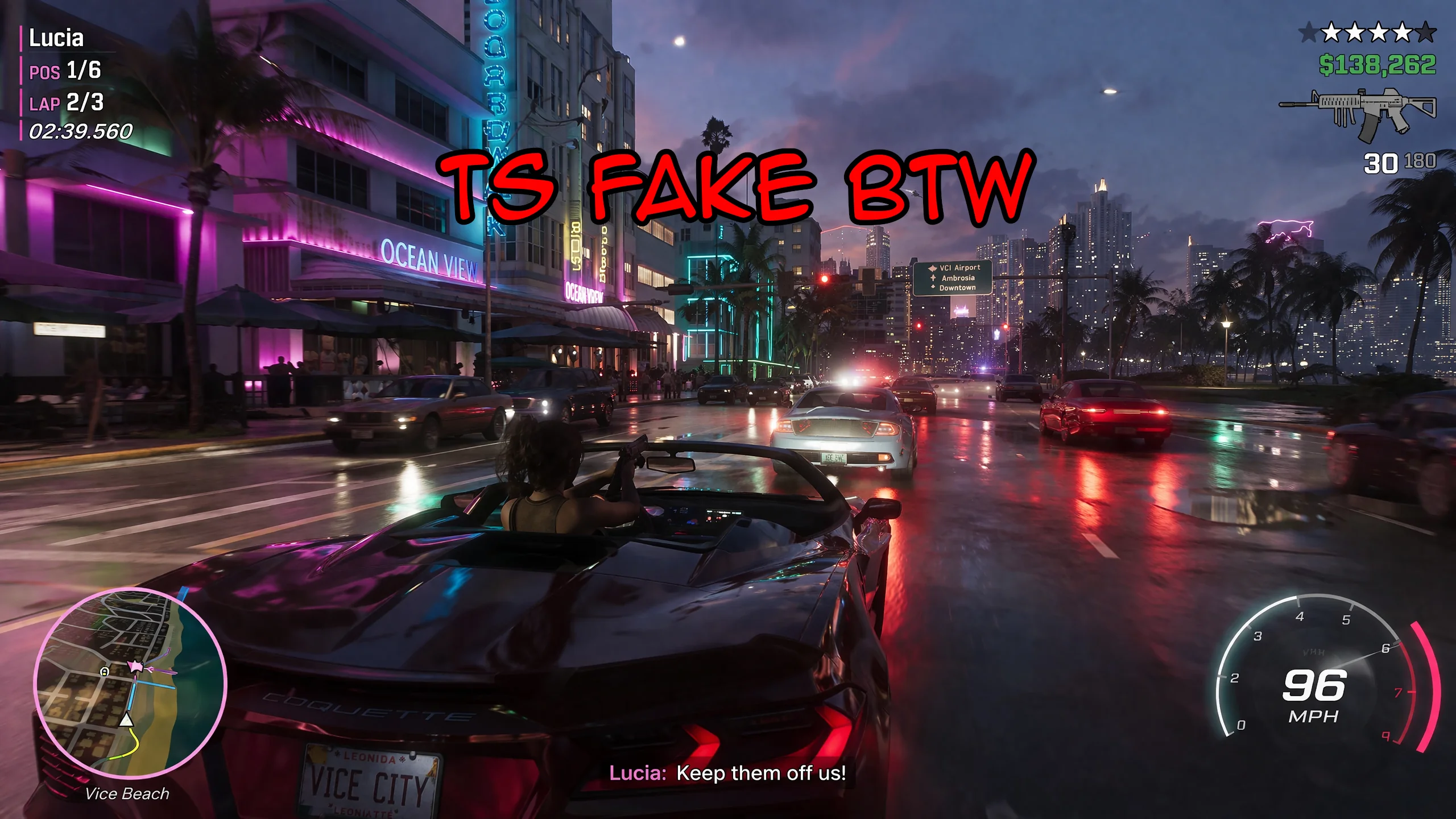
That's a GTA 6 gameplay reveal frame. Except it isn't — it's GPT Image 1.5 (high) in a single prompt. Zero retouch, zero Photoshop, zero manual HUD compositing. Every line of text, every UI widget, every neon storefront sign is model-generated in one shot. This is the kind of output the top of the leaderboard now produces.
How to read these ELO numbers
ImagineArt 2.0 ranks image models by blind-voting ELO: each visitor sees two un-labelled renders of the same prompt and picks the better one. Wins push the rated model up, losses push it down. Same scoring system as Chess.com.
Three things to know before reading any image-model ELO post:
- Confidence intervals matter more than the raw rank. GPT Image 1.5 (high) at 1275 ±10 means the "true" ELO is somewhere in 1265–1285. Nano Banana 2 at 1264 ±11 means 1253–1275. Those windows overlap — the order can flip on any given week.
- Sample count matters. Nano Banana 2 has 6,569 votes vs GPT Image 1.5 (high)'s 4,842. More samples = tighter confidence. The newer model on top is still being measured.
- 50 points is a real gap. Nano Banana Pro at 1214 sits well below both ±11 windows. That's an actual quality ceiling — not noise.
So the honest one-liner isn't "1.5 (high) beats Nano Banana 2." It's: #1 and #2 are statistically tied, and there's a 50-point cliff to #3. That changes how you should route work.
The other question worth asking: when is the quality bump worth the 2x API price? GPT Image 1.5 (high) costs $133/1k images vs Nano Banana 2's $67/1k. For a tied-on-quality model, that premium has to come from somewhere specific. The next sections show where it does — and where it doesn't.
Where GPT Image 1.5 (high) actually wins
1. Text inside images
Long strings — store names, menu items, product labels, broadcast UI — render cleaner. Fewer hallucinated characters, less warped typography, more reliable kerning. If you ship marketing creative with text overlays, this alone changes the math.
Every text element on a sports broadcast — the lower-third, the on-screen split-clock, the sponsor graphics — has to be pixel-perfect. Competitors blur numbers or invent league names. GPT Image 1.5 (high) holds structure all the way through.
This one's the hardest test in the set. A live chat sidebar with seventeen distinct viewers, each with a different avatar, username style, language mix, and timestamp — all generated in one shot. No existing image model before GPT Image 1.5 (high) could hold this much text coherence in a single pass.
2. Fine-detail product photography
Fabric weave, metal engravings, liquid reflections, leather grain — GPT Image 1.5 (high) keeps the micro-texture that Nano Banana models occasionally smooth over.
Not just the grain of the PS Vita's plastic — look at the screen-within-the-screen rendering the racing scene, the console reflection, the banner weave. Premium positioning hinges on this level of detail. For our own product hero shots we route to GPT Image 1.5 (high) every time now.
3. Prompt adherence for stacked constraints
When you stack 5+ constraints, the model needs to hit all of them. GPT Image 1.5 (high) gets more correct on the first pass — cutting iteration cost.
Nine constraints packed into one prompt — pixel-art style, cyberpunk theme, specific HUD layout, readable Japanese signage, mission objective overlay, health/stamina bars, minimap, inventory hotbar, lighting mood. The model held all nine on first render.
Where Nano Banana 2 still wins
- Speed — roughly 2-3x faster than GPT Image 1.5 (high) for the same prompt. When you're iterating, this compounds.
- Price — $67/1k vs $133/1k — exactly half. For high-volume output this is decisive.
- Variations — Nano Banana 2's turnaround makes it the better pick when you want 4 variants to choose from.
Nano Banana Pro sits in an awkward middle: same price as GPT Image 1.5 (high) but ELO 60 points lower. We don't route to it as a default anymore.
Our new routing rule
We changed our internal default the day the leaderboard flipped:
- Hero images, top-of-funnel ads, final product shots, text-heavy UI → GPT Image 1.5 (high)
- Drafts, iteration passes, social creative, variations → Nano Banana 2
- Thumbnails, bulk output, exploratory prompt work → Z Image
The 2x premium on GPT Image 1.5 (high) pays for itself if the image is going on a billboard or a landing-page hero. It doesn't pay for itself if you're generating fifty Instagram carousels a week. For those, Nano Banana 2 at half the price is the right call.
Style versatility is the under-appreciated story here. GPT Image 1.5 (high) moves from photorealistic broadcast to hand-drawn manga linework within the same session, same API, same prompt structure. You don't need four separate tools.
Try it yourself
Every new account at GPT Image2 Studio ships with 50 free credits — enough to render ~3 images on GPT Image 1.5 (high) or ~5 on Nano Banana 2 side by side. Same prompt, same output settings, blind-compare yourself. We built the workbench to make this comparison one click away.
Run the same prompt on both models: gptimg.app/generate
Every one of the eight images in this post was generated by GPT Image 1.5 (high) in one prompt each. No photobashing, no Photoshop layering, no manual HUD overlays. That's what SOTA looks like in April 2026.
One detail most benchmarks skip
ImagineArt's methodology pre-pends every text-to-image prompt with "Create the following as a square image:" and every edit prompt with "Edit the following to create a square image:". Without those prefixes the models produce mixed aspect ratios even when the test expects a square.
That detail matters when you're shipping commercial work: image aspect ratio is a prompt-engineering concern, not a model limitation. Our workbench ships every generation with an explicit aspect-ratio selector so you don't have to remember this.
The Bottom Line
The April 2026 ImagineArt 2.0 leaderboard, read honestly:
- #1 and #2 are statistically tied — GPT Image 1.5 (high) at 1275 ±10, Nano Banana 2 at 1264 ±11. Their confidence intervals overlap. Either one could top the table next week.
- #3 is 50 points back — Nano Banana Pro at 1214 sits well below the top two. That's a real quality cliff, not measurement noise.
- The 2x API price gap (#1 vs #2) is paid in three places: text inside images, fine product detail, and stacked-constraint adherence. Nowhere else.
- My routing rule: hero/text-heavy/final-deliverable shots go to #1, drafts and bulk variations go to #2, and I haven't routed to #3 since the gap opened up.
This isn't a permanent ranking. Gemini 3.1 Ultra is rumoured for May and Nano Banana 2 is still collecting votes. I'll update this post when the leaderboard moves — and our workbench will keep routing to whichever model tops it.
Run the same prompt on the top two yourself → gptimg.app/generate (50 free credits on signup — enough for a side-by-side blind compare; commercial rights at every tier).
Frequently asked questions
Do I need a credit card to try GPT Image2 Studio?
No. Every new account ships with 50 free credits on signup — enough to render on the top-ELO models and blind-compare them side by side. Paid plans only kick in if you want more than the free ceiling.
Can I use the generated images commercially?
Yes. Every tier — including the free 50-credit plan — comes with full commercial rights. Run ads, sell products, print on merchandise, publish on any platform. No watermark, no attribution required.
Which model should I route to for what?
Hero ads and text-heavy creative → GPT Image 1.5 (high). Product and macro texture work → Nano Banana Pro. High-volume social iteration → Nano Banana 2. Fast drafts and mood boards → Z Image. Our workbench routes one prompt across all of them in one click.
How fast is a single generation?
Z Image returns in ~10 seconds. Nano Banana 2 in 15–20. Nano Banana Pro and GPT Image 1.5 (high) in 30–45 for standard quality, up to a minute for 4K high-quality. Parallel runs across all models take the same wall-clock time as the slowest one.
What's the difference between GPT Image 1.5 (high) and Nano Banana 2?
On the April 2026 ImagineArt 2.0 Arena, GPT Image 1.5 (high) sits at 1275 ELO, Nano Banana 2 at 1264 — inside each other's confidence intervals (an 11-point gap with ±10/±11 CI means the order can flip on any given week). GPT Image 1.5 (high) wins decisively on text inside images; Nano Banana 2 is 2–3× faster and half the API cost.
Can I edit an existing image instead of generating from scratch?
Yes. All top-3 models support image-to-image and masked editing. Upload your reference, draw a mask over the region you want changed, and prompt the edit. The Nano Banana family and GPT Image 1.5 both preserve product geometry when given a reference — important for commercial product work.
Stop guessing the model.
Run all three.
We route your prompt to GPT Image 1.5 (high), Nano Banana 2, Z Image and more — same workbench, same prompt, side-by-side blind compare. 50 free credits on signup and commercial rights at every tier.
50
Free credits
5+
SOTA models
30s
To first render
Keep reading

The ChatGPT image generator, explained: what it actually is, how much it costs, and when to use it in 2026


Nano Banana Pro: the complete 2026 guide (prompts, pricing, and when to use it over GPT Image 1.5)